
I timed it. On Bitget, from opening the app to a filled market order on the same coin: 51 seconds. On OKX, same trade, same size, same network: 3 minutes and 10 seconds. Two minutes and nineteen seconds separate two exchanges doing the identical job, and that gap is the real story here, not the coin count or the fee page either one publishes.
I ran both accounts side by side for six weeks this September, funding each with a small working balance and using them the way I’d actually trade: market orders, a couple of limit orders, one attempt at copy trading, and a withdrawal at the end. What follows is what I counted, not what either exchange claims about itself. For the single-exchange version of this test, the Bitget review covers it in isolation, fees and all.
What I actually counted
| Task | Bitget | OKX |
|---|---|---|
| Steps to a filled market order | 6 steps, spot default | 11 steps, pair + order type + margin mode |
| First session before it felt familiar | About 4 minutes | About 22 minutes |
| Steps to start copy trading | 4 steps from the home screen | Not the platform’s focus; manual position management |
| Withdrawal, same coin and amount | 3 screens, fewer network choices | 4 screens, more network choices |
Six steps to a filled order on Bitget. Eleven on OKX, because OKX asks you to confirm the trading pair, the order type, and a margin mode screen that Bitget skips by defaulting you into spot. Neither is wrong. One is built to get you into a position before you second-guess it. The other is built to make sure you meant to do what you’re about to do.
Bitget wants you to act quickly
Nothing about Bitget’s speed is an accident. The trading screen shows less at once, the buttons are larger, and the app doesn’t ask you to pick a margin mode before it lets you buy something simple. I placed my first order without reading a single tooltip, which either says the design works or says I was careless. Probably both.
Copy trading is the other half of Bitget’s pitch, and it sits one tap from the home screen rather than buried in a menu. Pick a trader, set an allocation, confirm. It took me four steps to start copying a trader I’d picked from the leaderboard, which is fewer steps than it took me to place a single order on OKX. Bitget’s current bonus is here.
That same simplicity turns into a limit once you want more control. There’s no easy way to stagger entries or scale out of a position in pieces; you place one order, watch it fill, and place the next one by hand. If your trading is mostly “buy, hold, sell,” you won’t miss it. If it isn’t, you will.
OKX takes longer, but you grow into it
OKX’s first session felt slow in a way that had nothing to do with the app lagging. It’s slow because there’s more of it: more markets on one screen, more order types visible by default, more settings you’re expected to have an opinion about before you place a trade. I spent close to 22 minutes on my first session just working out where things lived. On Bitget that number was 4.
By week two the extra structure stopped feeling like friction. Conditional orders, a wider set of chart tools, and the ability to set take-profit and stop-loss levels at the moment you open a position, not after, are all things Bitget makes you build manually or skip. If you’re doing anything beyond simple entries and exits, OKX’s advanced charting tools start to earn the extra clicks. The trade-off is that every one of those extra clicks is a place to make a mistake when you’re new.
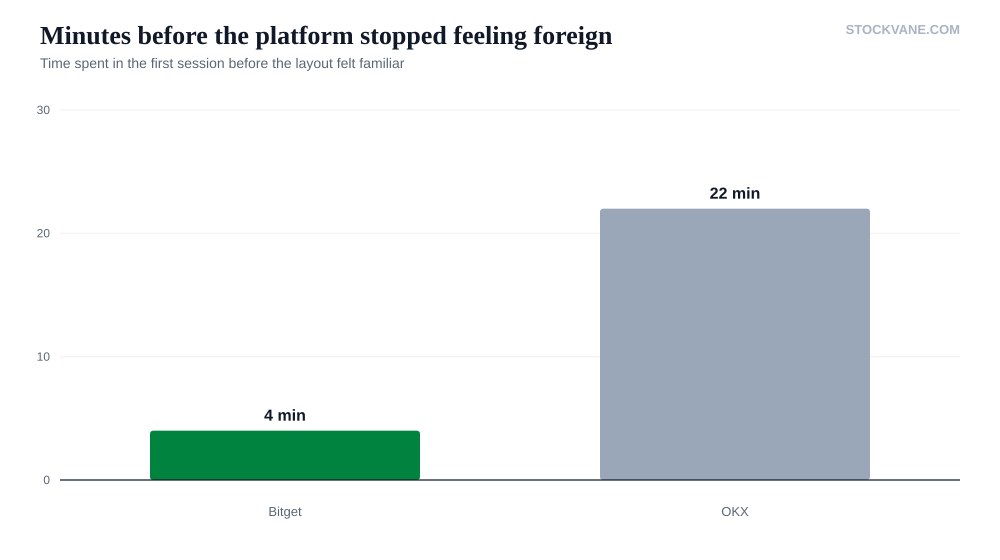
Twenty-two minutes doesn’t sound like much until you’re the one sitting there on day one, unsure whether the button you’re about to press opens a position or closes one. That’s the actual cost of OKX’s depth. It isn’t a bad design. It’s a design that assumes you already know what a margin mode is, and punishes you a little if you don’t.
Copy trading sounds better than it feels
I ran Bitget’s copy trading for the full six weeks rather than just clicking around, and the honest result is mixed. The trader I picked had a strong two-week run before I allocated capital, then gave back nearly half of it over the following month. That’s not a flaw in the feature so much as a fact about performance chasing: a leaderboard rewards whoever’s hot right now, and hot streaks end. I’d treat it the way I’d treat any manager I hadn’t watched through a full cycle, which is carefully, with money I could afford to lose twice over.
OKX doesn’t push you toward copying anyone. You’re expected to manage your own positions, which felt less exciting in week one and more sound by week six. Neither approach is dishonest. One outsources judgment, the other assumes you’ll build it.
Fees, and moving funds
Published fee schedules change often enough that quoting a number here would be stale within a quarter, so I won’t pretend either page is gospel. What I can say from six weeks of actual trades: Bitget’s costs stayed in the background enough that I stopped thinking about them mid-trade. OKX’s can come out lower depending on the market and the order type, but there are more places for a fee to hide, funding rates, conversion spreads, tiered maker-taker schedules, so the “cheaper” platform took more attention to actually trade cheaply. OKX’s current offer is here.
Withdrawals worked on both, every time, across six weeks. The difference was how much I had to think before confirming. Bitget gives you fewer networks to choose from, so there are fewer ways to pick the wrong one. OKX gives you more choice and more places to make an expensive mistake if you’re not paying attention to which chain you’re sending on. For anyone moving a four-figure balance or larger, that extra ten seconds of checking is not optional.
The one real risk neither exchange fixes
Speed and depth are UX questions. The risk underneath both platforms is the same and older than either app: you don’t control the keys. Funds sitting on any centralized exchange, fast or slow, simple or advanced, are funds you’re trusting a company to hold correctly, secure properly, and let you withdraw on demand. Six smooth weeks tells you the interface works. It tells you nothing about what happens in a bad week, and neither exchange’s design choices change that math. If you wouldn’t be comfortable seeing withdrawals paused for 48 hours during a stress event, size accordingly on either one.
There’s a second, smaller risk that’s easy to miss because it feels like a convenience rather than a danger. The faster an interface is, the less friction stands between you and a trade you’ll regret an hour later. Bitget’s six-step order flow is a feature when you know exactly what you want to do. It’s a liability when you’re reacting to a candle instead of a plan. OKX’s extra screens slow down good decisions and bad ones equally, which is a worse deal on your best days and a better one on your worst.
Who each one actually suits
I’d point a first-time crypto trader toward Bitget for the first month, specifically because the smaller surface area means fewer ways to get lost. Once you’ve placed real trades and started asking questions the interface can’t answer, the case for OKX gets stronger fast: staggered entries, tighter stop management, a broader set of markets in one place. Traders who came from a traditional brokerage, where a beginner-versus-pro split is common practice, will recognize the shape of this trade-off immediately. It’s the same choice with different names.
Which I ended up using more
I didn’t fully switch. Bitget became the app I opened for speed, for testing copy-trading ideas, for anything I wanted to get into and out of without thinking hard. OKX became where I put anything that needed more attention: larger size, staggered entries, positions I didn’t want to feel rushed on. That split, more than any feature list, is the honest answer to “which is better.”
Don’t spend too long comparing specs on paper. Both platforms are competitive, and both will execute a basic trade correctly. The real difference is behavioral: Bitget makes it easy to act fast, sometimes too fast, and OKX slows you down, sometimes more than you’d want on a day when the market is moving. Match the platform to how you actually trade.
Neither app is going to fix a bad process for you. If you’re the kind of trader who checks a position four times an hour, Bitget’s speed will feed that habit rather than cure it. If you’re the kind who forgets to set a stop, OKX’s extra screen asking you to confirm the order type at least gives you one more chance to catch yourself before it’s live.
The five-minute test I’d run before choosing
Open both apps, cold, no account yet. Time how long it takes each one to show you a live price chart for a coin you actually want to trade, with no login. Then time how long it takes to find the deposit screen. If the gap between the two is under a minute, the interface probably won’t matter much to you either way, and you should pick on fees and coin selection instead. If the gap is closer to what I clocked, closer to two and a half minutes, that gap will still be there on your fiftieth trade, not just your first.
<strong>Financial disclaimer:</strong> <em>The content on StockVane is for educational and informational purposes only and should not be construed as professional financial advice. Crypto trading carries a high risk of loss.</em>
Financial disclaimer: The content on StockVane is for educational and informational purposes only and should not be construed as professional financial advice. Stock market investing involves risk of loss.
Sources: Stock options tax topic (IRS) (https://www.irs.gov/taxtopics/tc427) · Earnings reports (SEC Investor.gov glossary) (https://www.investor.gov/introduction-investing/investing-basics/glossary/earnings-report)